Guides
ANIIMO Inheritance Guide
Inheritance transfers developed progress from a more developed source Aniimo to a less developed inheriting Aniimo. The live client explicitly includes EXP, level, Resonance stage and Star Rank, Capability Awakening and Capafruit, returns surplus growth items in full, and shows a 20,000-coin confirmation cost in the verified example.
- Start from an Aniimo's information panel and choose Inherit.
- Inheritance only applies from a fully developed Aniimo to a less developed one.
- The client explicitly names EXP, level, Resonance stage and Star Rank, Capability Awakening and Capafruit as inherited progress.
- The verified confirmation screen shows a 20,000-coin cost; this is a documented example, not a universal price formula.
Last verified in the live client: October 4, 2026.
What Is Inheritance in ANIIMO?
Inheritance is a progression-transfer system. It lets a more developed Aniimo pass its accumulated development to a less developed Aniimo, rather than asking you to rebuild every supported progression track from the beginning. The live rules describe the direction clearly: inheritance applies from a fully developed Aniimo to a less developed one.
That direction is the most important rule to understand. The Aniimo receiving the progress is the inheriting Aniimo; the developed Aniimo supplying that progress is the source. The selection screen presents both sides together so you can compare their level, combat power and visible attributes before committing.
Inheritance is not evidence that two Aniimo become the same species or that every property is exchanged. It is a transfer of supported development. The client explicitly names several types of progress, but it also uses the phrase “and more” without enumerating every additional field. This guide therefore documents the named items and stops there.
Where to Find the Inherit Button
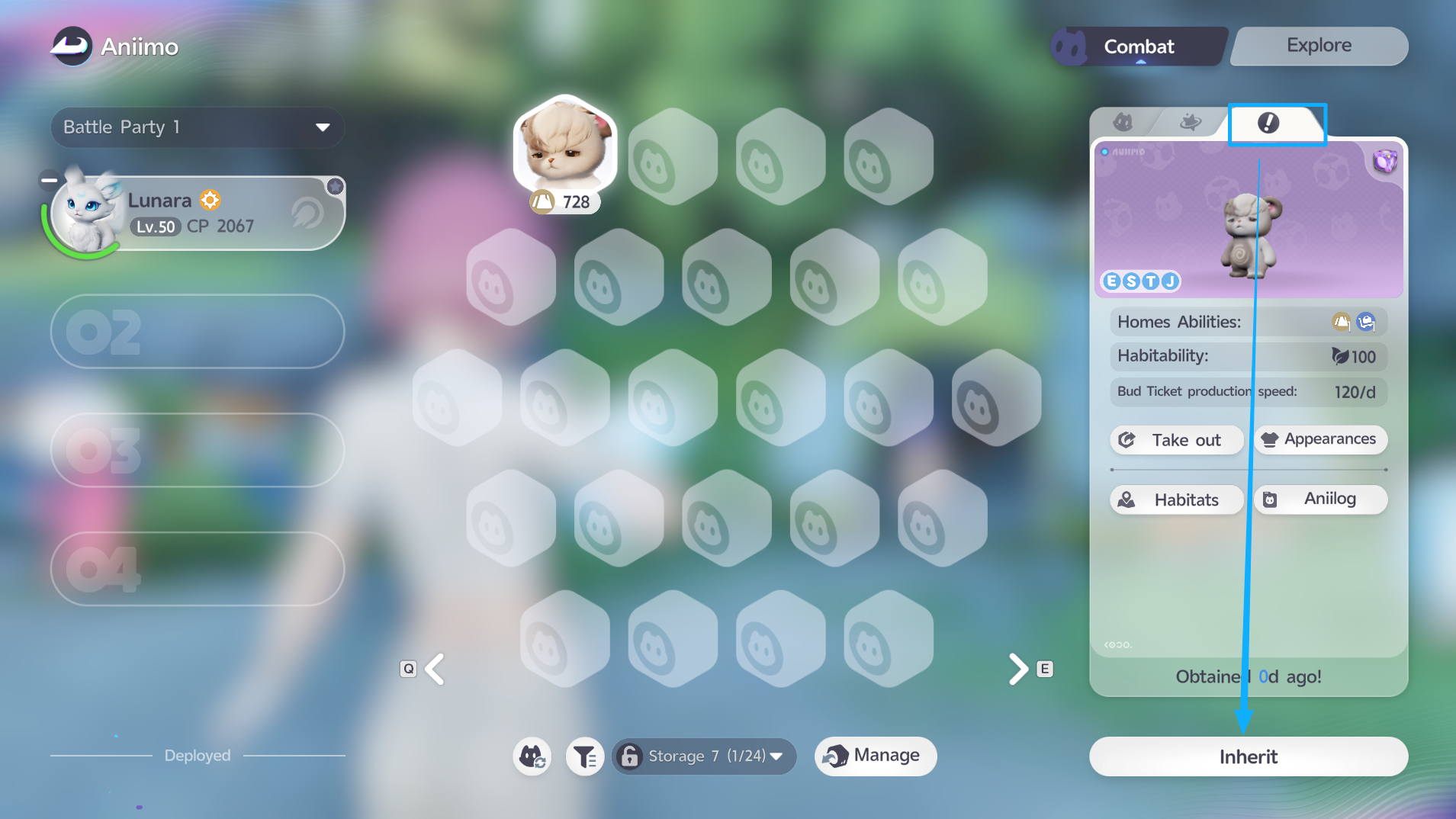
Open Aniimo Management, select the Aniimo that should receive progress, and open its information tab. The verified screen shows an Inherit button at the lower right beneath the selected Aniimo’s panel.
The button is attached to the currently selected Aniimo. Before opening it, confirm that the selected profile is the intended recipient rather than the developed source you plan to choose on the next screen. This simple check reduces the chance of reversing the two sides mentally.
The Core Inheritance Rule
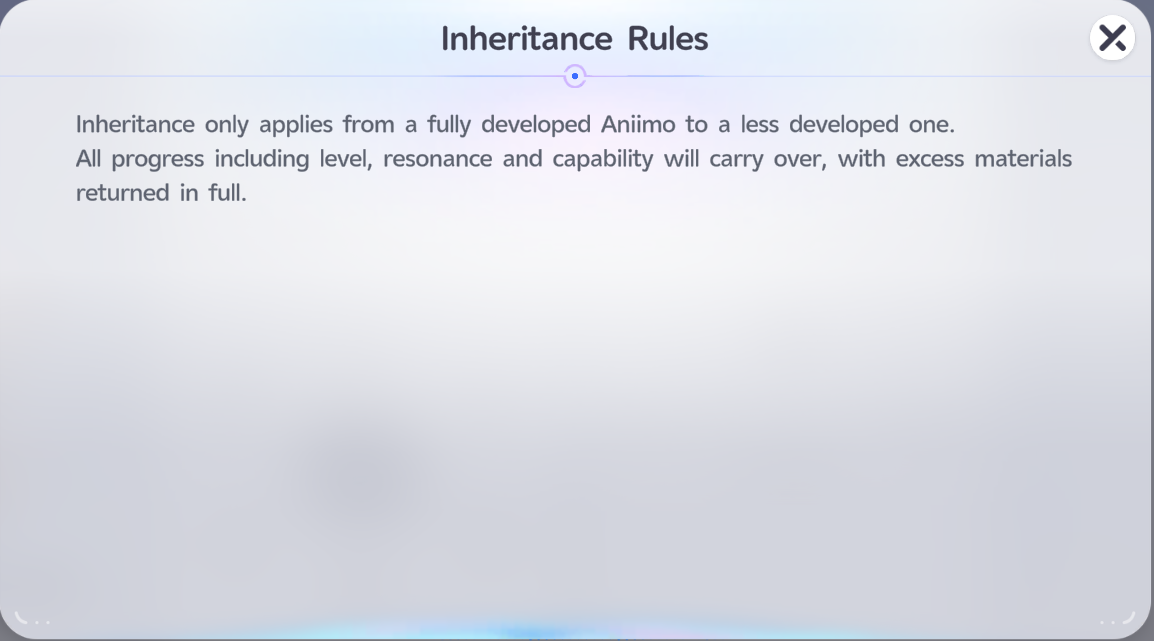
The live Inheritance Rules popup states that inheritance only applies from a fully developed Aniimo to a less developed one. It then says that all progress, including level, Resonance and Capability, will carry over, with excess materials returned in full.
This establishes three practical facts:
- The transfer has a development direction; it is not an unrestricted swap between any two Aniimo.
- Multiple progression systems can move together rather than requiring an isolated transfer for each one.
- Progress that exceeds what the recipient can use is handled through returned materials according to the client text.
“Returned in full” is the client rule for excess materials. It should not be expanded into a custom refund formula, a predicted inventory list or a claim about currencies the screen does not name. Read the final comparison and confirmation prompts for the actual transaction in front of you.
How to Choose the Source Aniimo
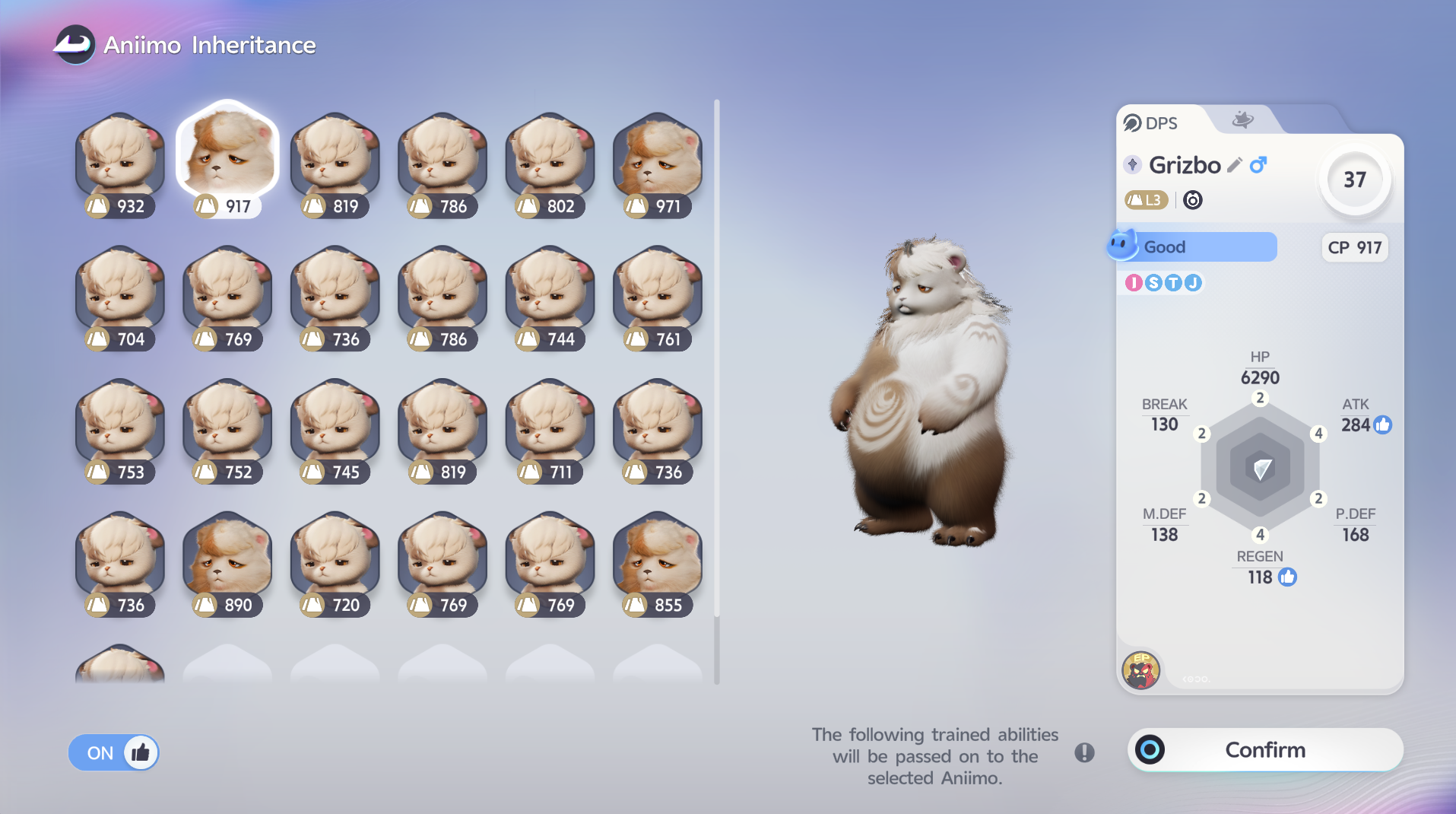
After entering Inheritance, the source-selection screen lists eligible Aniimo. The selected source’s profile appears on the right with its level, CP and six visible combat attributes. The interface also says that the following trained abilities will be passed on to the selected Aniimo.
Use the screen as a verification step, not just a list. Check the source’s name, form, level and CP, then compare the detailed profile. Similar-looking Aniimo or multiple copies can appear together, so appearance alone is not a safe identifier. In the verified example, the list contains many related-looking entries with different CP values.
The thumbs-up filter shown in the capture is an interface control, but the evidence does not define every rule behind its recommendations. It is safer to verify the actual profile than to treat a visual recommendation as a complete optimization system.
What Progress Carries Over?
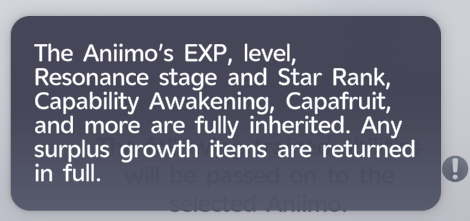
The detailed information tooltip is more specific than the short rules popup. It says the Aniimo’s EXP, level, Resonance stage and Star Rank, Capability Awakening, Capafruit, and more are fully inherited. It also repeats that surplus growth items are returned in full.
Those named categories can be read as follows:
- EXP and level carry the source’s ordinary level development.
- Resonance stage and Star Rank carry the supported Resonance and Star Up investment.
- Capability Awakening carries the supported Acquired Potential development described in the Potential guide.
- Capafruit carries the one-time Innate Potential improvement associated with that item.
The wording “and more” confirms that the list is not exhaustive, but it does not identify the omitted categories. It would be unsafe to turn that phrase into claims about Held Items, Personality, Evolution state, learned skills or any other specific system without a screen that names it.
Review the Before-and-After Comparison
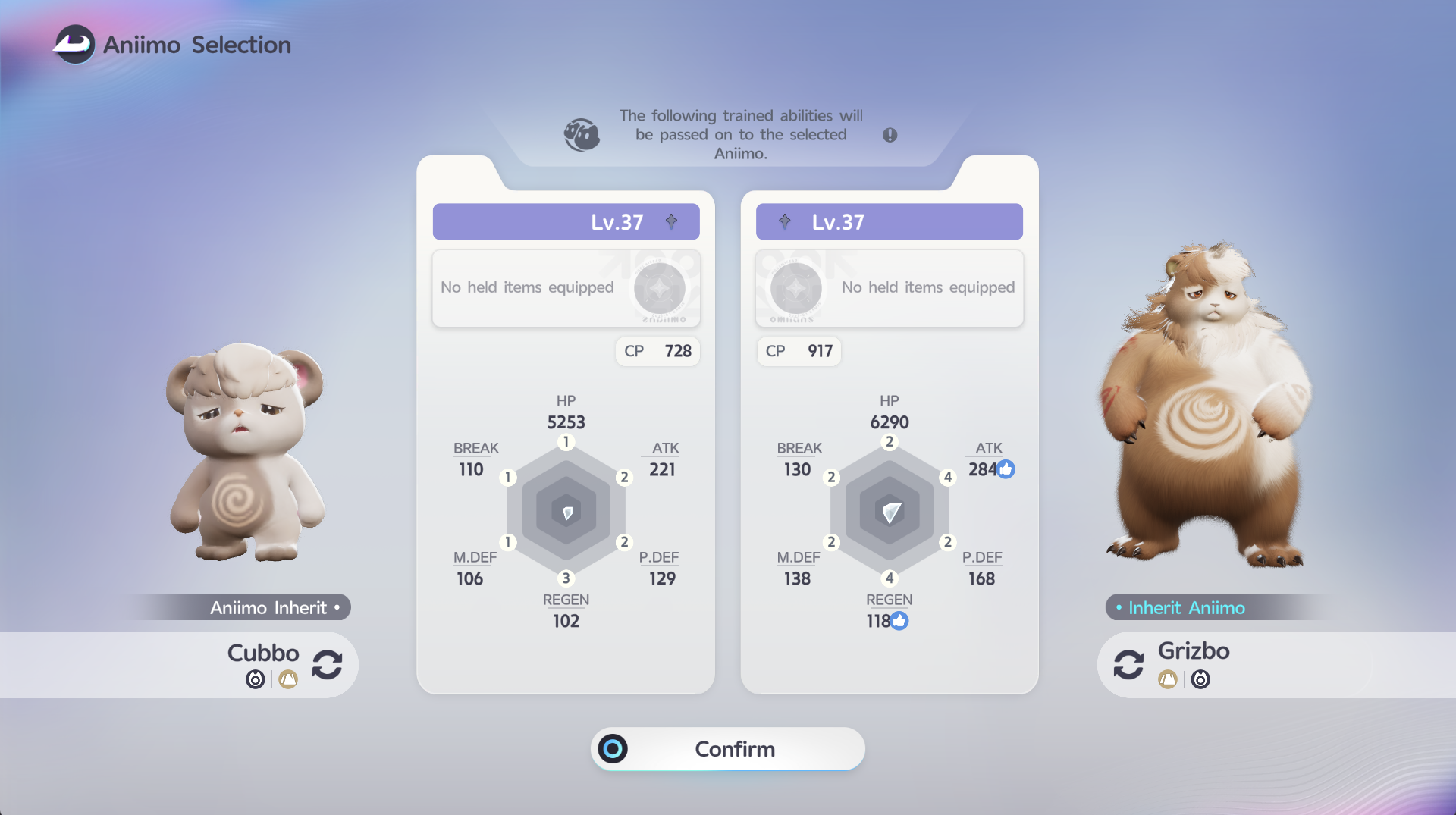
The comparison screen places the inheriting Aniimo on the left and the source Aniimo on the right. Between them, the interface displays their levels, CP and six attribute values. This is the point to confirm that the transfer direction matches your intention.
In the captured example, Cubbo is labeled Aniimo Inherit and appears on the left, while Grizbo is labeled Inherit Aniimo on the right. Both are Lv.37, but their CP and visible attributes differ. The exact values belong to this pair and do not establish a universal conversion formula.
Treat the comparison as a final audit:
- Confirm the intended recipient is on the inheriting side.
- Confirm the intended developed source is on the source side.
- Read the visible level, CP and attributes rather than relying only on portraits.
- Open the information tooltip if you need to recheck which named progression categories carry over.
- Continue only when the relationship shown on screen is correct.
How Much Does Inheritance Cost?
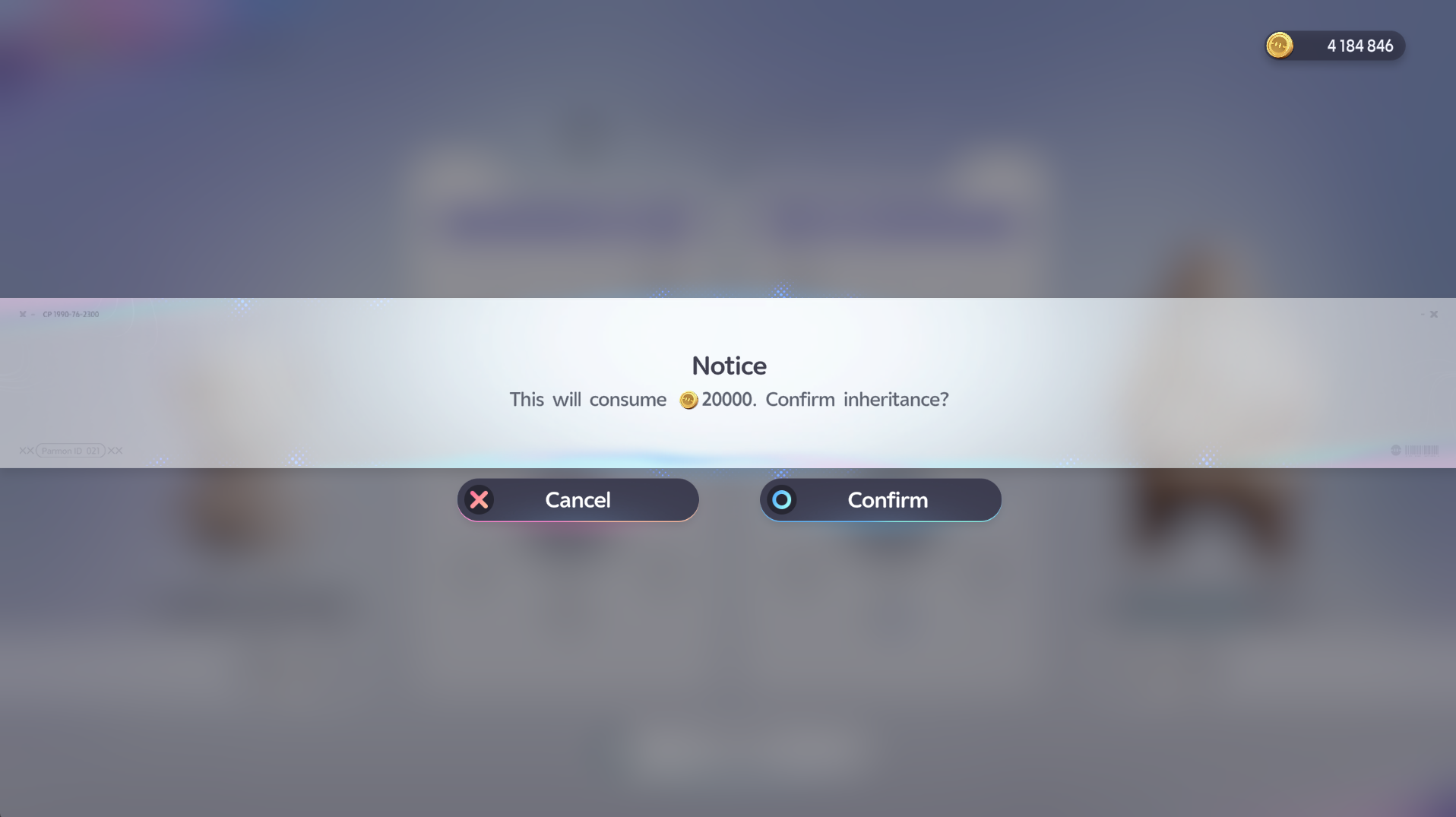
The verified confirmation prompt says, “This will consume 20000. Confirm inheritance?” A coin icon appears beside the amount. This provides one firm live-client example: the shown transaction costs 20,000 coins.
It does not provide a pricing formula. The screenshot does not say whether the price changes with level, species, stage, progression gap or repeated use. For that reason, 20,000 coins should be treated as the verified cost of the shown inheritance, not a guaranteed price for every future transaction.
Always use the final prompt as the authority for the transfer you are about to make. It gives you one last chance to cancel if the cost or selected pair is not what you expected.
A Safe Inheritance Checklist
Before you confirm, work through this short sequence:
- Select the less developed Aniimo that should receive progress.
- Open its information tab and choose Inherit.
- Read the Inheritance Rules if this is your first transfer.
- Choose the developed source by checking name, form, level, CP and attributes.
- Verify the recipient and source on the comparison screen.
- Review the named inherited progress and the returned-material rule.
- Read the coin amount on the final confirmation prompt.
- Confirm only when the pair, direction and price are correct.
This process does not attempt to identify a “best” inheritance target. That decision depends on the Aniimo you want to develop and on investments visible in your own account. The Training & Progression guide can help you separate the development systems before deciding what you want to transfer.
Common Inheritance Mistakes
- Reversing the developed source and the less developed recipient.
- Selecting one of several similar-looking copies without checking its profile.
- Assuming “and more” proves that every game system transfers.
- Treating returned surplus growth items as evidence of an unpublished refund formula.
- Assuming the displayed 20,000-coin example is the permanent cost for every case.
- Skipping the comparison screen because both Aniimo show the same level.
- Confusing transferred progression with Evolution or a change of canonical identity.
ANIIMO Inheritance FAQ
Who can inherit progress?
The live rules say inheritance applies from a fully developed Aniimo to a less developed one.
What carries over through Inheritance?
The detailed tooltip explicitly names EXP, level, Resonance stage and Star Rank, Capability Awakening and Capafruit. It also says “and more,” but the additional fields are not identified by this evidence.
Are excess materials lost?
The client says surplus or excess growth materials are returned in full. It does not provide a per-item refund table in the supplied screens.
How much does Inheritance cost?
The verified example shows 20,000 coins. Check your own final prompt because the evidence does not establish a universal pricing rule.
Does Inheritance transfer Capafruit?
Yes. Capafruit is explicitly named in the progress tooltip.
Does Inheritance transfer Held Items or Personality?
The supplied screens do not explicitly name either system, so this guide does not claim that they transfer.
Can Inheritance change one Aniimo into another?
The evidence describes a transfer of development between a source and an inheriting Aniimo. It does not describe an identity or evolution transformation.
Tips & warnings
- Check the source and inheriting Aniimo carefully before confirming a transfer.
- The client says "and more," but the available evidence does not identify every additional inherited field.
- Do not generalize the shown 20,000-coin price to every inheritance scenario without checking the live confirmation screen.
What to do next
Sources & verification
- In-game verified: Inheritance entry, rules, source selection, progress tooltip, comparison and confirmation screens, live game client Checked Oct 4, 2026.
Last updated: Oct 4, 2026