Guides
ANIIMO Weather & Time Spawn Guide
Weather, time and region can help distinguish which ANIIMO form you are looking for. Check the area's visible weather indicator, use the time-period control, then confirm the exact form and habitat in the Aniidex instead of assuming every form appears wherever its base ANIIMO is listed.
- The live client names four selectable time periods in this order: Dawn, Noon, Dusk and Nighttime.
- World-map area labels visibly communicate weather; supplied examples show Thunderstorm, Rain and a Clear / Sunny weather icon.
- Current Aniidex records include Rainstorm, Thunderstorm, Snowfield, Cloudmist and Nighttime form labels, but a habitat association is not an exact spawn point.
Last verified against the live client and current ANIIMO Central dataset: October 4, 2026.
What Weather and Time Change in ANIIMO
ANIIMO can document different forms for the same creature, and some of those form names are tied to environmental conditions. The current database includes explicit Rainstorm Form, Thunderstorm Form, Snowfield Form, Cloudmist Form and Nighttime Form records. The official game description also states that encounters can vary by environment, weather, phenomena and time of day.
That does not mean weather changes every spawn or guarantees a special form. Use three separate pieces of information: the exact form name, the habitat or region association, and the condition visible in the current client. The Aniidex groups forms under one canonical ANIIMO profile, while the locations index shows official habitat associations. Neither page claims an exact coordinate or encounter rate.
How to Check or Change the Time Period
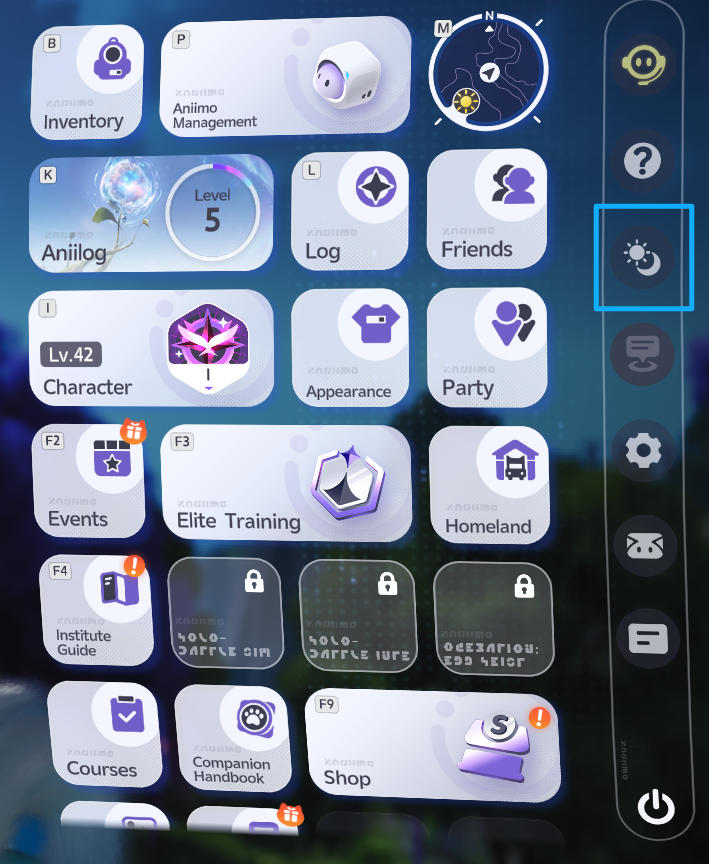
Open the main menu and select the circular sun-and-moon control on the right-side rail. The supplied live-client screen shows that this opens a time-selection wheel.
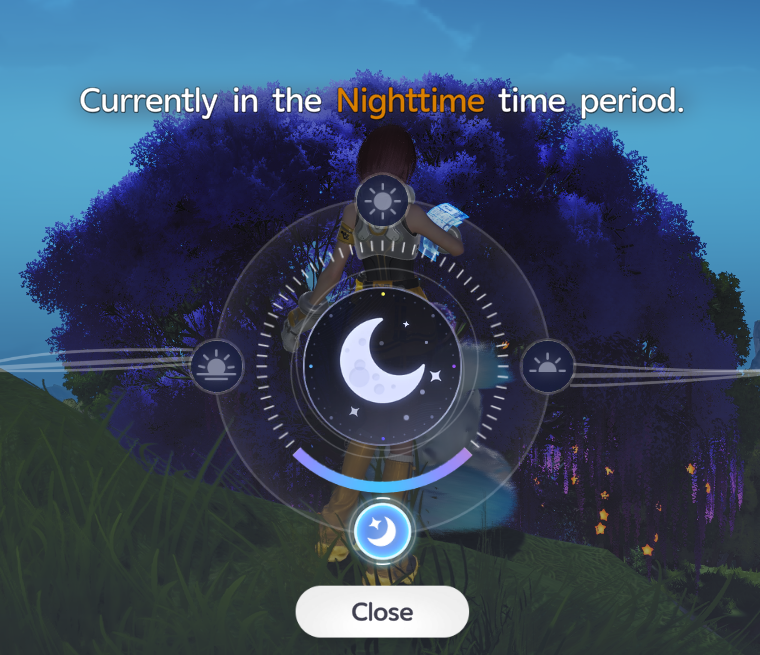
The user-verified selectable periods are Dawn, Noon, Dusk and Nighttime, in that order. The wheel screenshot below is currently set to Nighttime. These are the client labels, not a real-world clock conversion: the evidence does not publish exact hour ranges, how long a period lasts, a cooldown, or whether the control behaves identically in every activity.
How to Read Weather on the World Map
Area labels on the world map include a weather icon. The supplied examples show a thundercloud for Sea of Flowers, rain for Nimbus Fields, and a sun for The Argent Strait. This guide describes that visible sun symbol as the Clear / Sunny weather icon; the screenshot does not establish “Clear” or “Sunny” as its canonical in-game label. This is useful for checking current conditions before traveling.
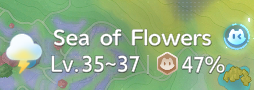
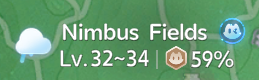
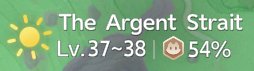
The icons prove that distinct weather states are visible at area level. They do not establish weather probability, forecast duration, every possible state in every region, or that a particular ANIIMO is currently present.
Weather and Time Forms in the Current Database
The table uses current nested form records and links each example to its single canonical profile. Habitat text is profile context from the official import, not a precise spawn coordinate.
| Condition label | Documented examples | Habitat context |
|---|---|---|
| Thunderstorm Form | Scorchhowl, Thornblade | Beast Fang Ridge; Sea of Flowers |
| Rainstorm Form | Nimbi, Luminelle | Nimbus Fields / The Argent Strait; Tideblossom Coast |
| Snowfield Form | Skippy, Baleetle | Nimbus Fields / Mistwoods / Forest of Falling Stars; Berylline Causeway |
| Cloudmist Form | Nimbi, Turbo | Nimbus Fields / The Argent Strait; Nimbus Fields |
| Nighttime Form | Flutternym, Bonesky | Several imported habitats; Beast Fang Ridge / Driftwise Meadow |
This is a compact example set, not a complete spawn encyclopedia. A form label can establish the documented form category, while the entity habitat list only establishes an association. It is safest to confirm both and then inspect the client rather than reading the table as a promise of a spawn.
Region + Weather + Time: Why the Exact Form Matters
One ANIIMO may have a Basic Form plus several regional, weather, time or Prismana forms. Those variants stay nested under the same profile because they are forms of one canonical entity, not separate species pages. When searching, write down the complete target label—such as “Nighttime Form” instead of only the base name.
Then check the target profile’s form list and habitat context. A region name alone may apply to the entity broadly, not every form independently. Likewise, seeing rain on the map does not prove that every Rainstorm Form is available in that area. The Regional Forms guide explains this identity model in detail.
What to Do When an ANIIMO Is Not Spawning
First verify that you are looking for the correct form, not simply the correct ANIIMO name. Second, check the area’s current weather icon and the current Dawn, Noon, Dusk or Nighttime period. Third, revisit the Aniidex profile and location association. If the evidence only lists the base ANIIMO in that habitat, do not silently convert it into form-specific proof.
Also separate condition problems from ordinary discovery uncertainty. This dataset does not contain exact spawn points, rates, weather odds, hidden timers or guaranteed encounter rules. Moving around an associated region may still be necessary, and absence during a short search does not prove the database relationship is wrong.
Weather vs Prismana Flow
Weather and Prismana Flow are different systems. The regional Nurture table identifies which Prismana target can be attracted when Prismana Flow is triggered in a region. It does not turn that form into a permanent weather spawn.
The same evidence boundary works in reverse: a weather-form record does not establish a Prismana requirement. The live Branch screen places Nurture and Change Weather near each other, but no verified source says that changing weather is required to trigger Prismana Flow. Use the Prismana guide for form records and the Flow guide for the regional Nurture loop.
Common Weather and Time Mistakes
- Treating a current map icon as a promise that a particular form has spawned.
- Converting Dawn, Noon, Dusk and Nighttime into invented clock-hour ranges.
- Assuming all regions support every weather state or that weather has known equal odds.
- Reading a base habitat as independently verified habitat data for every nested form.
- Confusing Rain shown on a map with the exact imported label “Rainstorm Form.”
- Combining Weather and Prismana Flow into one undocumented mechanic.
ANIIMO Weather & Time FAQ
What time periods can I select?
Dawn, Noon, Dusk and Nighttime are the four user-verified live-client labels. Exact clock ranges and period duration are not established here.
How do I see the current weather?
Check the icon beside an area’s label on the world map. Supplied examples visibly show Thunderstorm, Rain and the sun symbol described here as the Clear / Sunny weather icon.
Does the map icon guarantee a weather form?
No. It communicates the area’s current weather state. Use the exact form record and habitat context as separate evidence.
Does ANIIMO Central publish spawn rates?
No. The current repository deliberately avoids inventing spawn rates, weather probabilities, exact coordinates and hidden timers.
Are Nighttime Forms separate ANIIMO?
No. They are nested forms on one canonical ANIIMO entity page.
Is weather required for Prismana Flow?
No verified source in the current evidence establishes that requirement. Treat the systems separately.
Tips & warnings
- No verified source in this evidence set establishes clock-hour ranges, period length, weather odds, forecast duration, cooldowns or spawn-rate multipliers.
- Weather requirements and Prismana Flow are separate mechanics; do not treat a base habitat or weather label as Prismana spawn evidence.
Related ANIIMO
What to do next
Sources & verification
- In-game verified: Time control, time-period wheel and world-map weather indicators, live game client Checked Oct 4, 2026.
- Officially confirmed: ANIIMO Central imported official Wiki form and habitat records Checked Oct 4, 2026.
Last updated: Oct 4, 2026