Guides
ANIIMO Eggs & Hatching Guide
Eggs in ANIIMO are hatched at Hatchinators, including Outpost Hatchinators and Home Hatchinators. Before hatching, read the egg's own description and the selected Aniipod effect, because different twining items can change the hatched Aniimo's guaranteed outcome.
- The verified egg detail text reads "Hatch the egg in the Outpost Hatchinators and Home Hatchinators."
- The Twine an Aniipod step attaches an item that changes the hatch's guaranteed outcome, and the selected item's effect text is shown before you confirm.
- The Home Hatchinator is a placeable facility found under Functional Facilities > Aniimo Facilities in the Homeland build menu.
- Only the twining effects that are visibly verified in this evidence set are documented here.
Last verified in the live client: October 2, 2026.
What Are Eggs and Hatchinators in ANIIMO?
Eggs are items that carry an ANIIMO outcome, and a Hatchinator is the object that hatches them. The live client names it the Aniimo Hatchinator, and the egg’s own detail screen states where that egg is allowed to be hatched.
Three things are worth separating before you spend anything: the egg itself and what it guarantees, the hatch location you use, and the twining item you attach during hatching. This guide uses the Perfect Flamerion Egg as its worked example, because its detail text, its twining options and its hatch result are all part of the same evidence set.
Not every egg carries the same promise. Read the egg’s own text instead of carrying an assumption across from a different egg.
Read those three parts in order and the system stops being opaque. The egg tells you what is guaranteed and where it may be hatched, the Hatchinator is the object that performs the hatch, and the twining item is a modifier you choose at the moment of hatching. Every statement on this page comes from those on-screen texts, and the guide stops where the evidence stops.
Where to Hatch Eggs
The egg detail screen answers this directly: “Hatch the egg in the Outpost Hatchinators and Home Hatchinators.” That single sentence verifies two hatch location types for this egg — an Outpost Hatchinator and a Home Hatchinator.
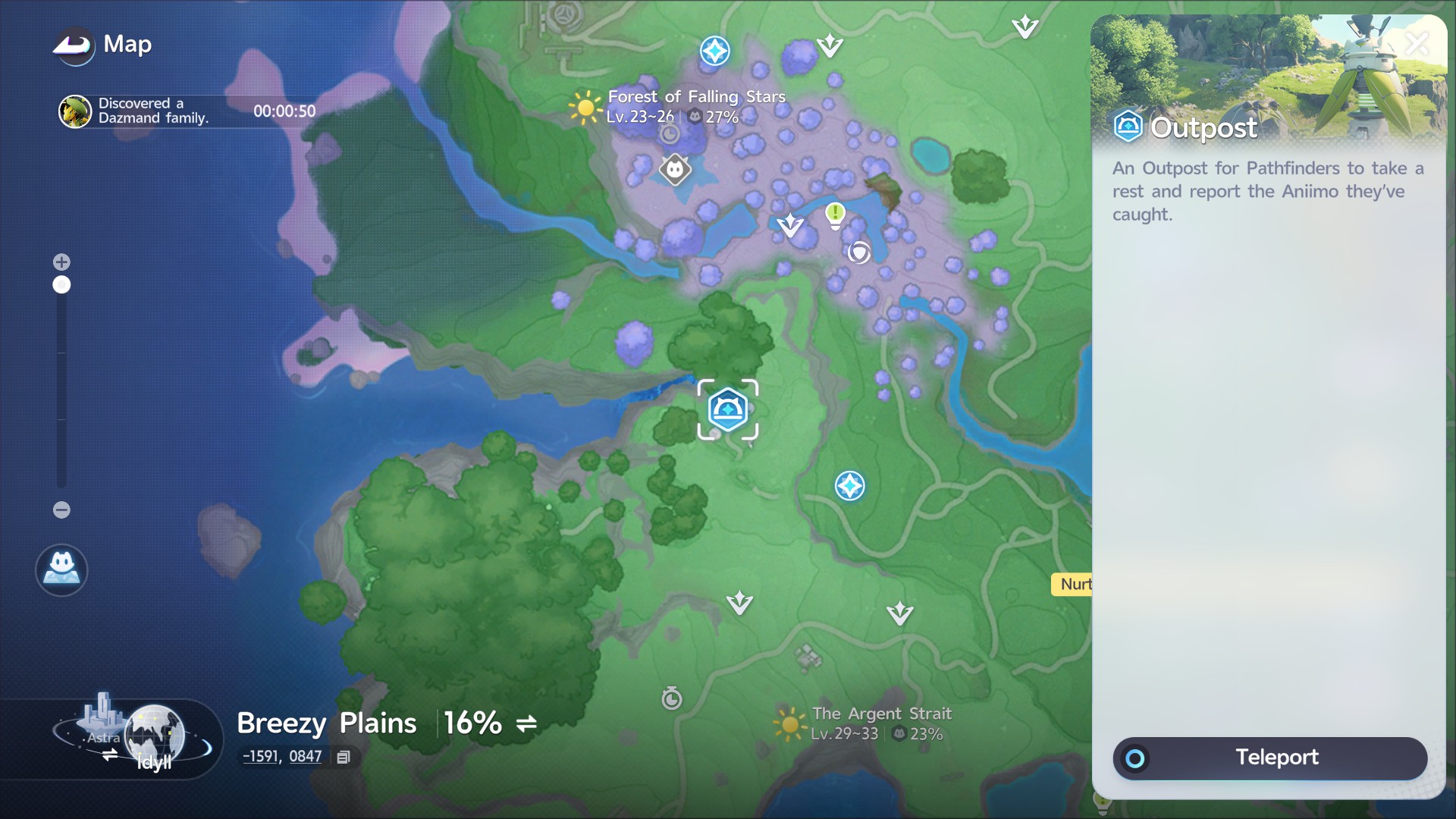
Outposts are map locations you travel to. The map panel describes one as “An Outpost for Pathfinders to take a rest and report the Aniimo they’ve caught,” and selecting the Outpost icon offers a Teleport action, so it is a destination rather than a menu you open from anywhere.
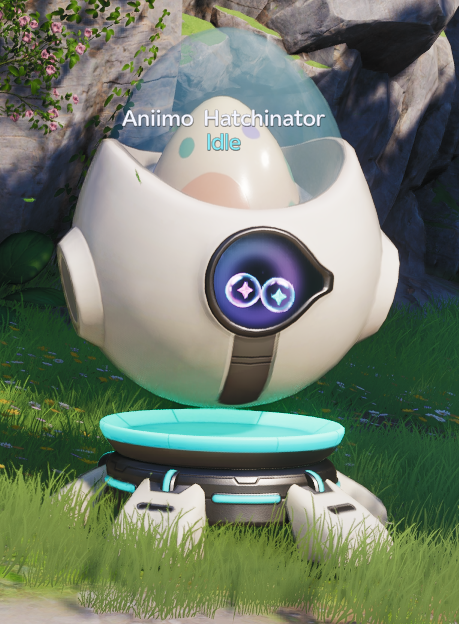
At an Outpost, the object you interact with is the Hatchinator. The live client labels it “Aniimo Hatchinator” and reports its current state, which reads Idle in this capture.
One caution about the map evidence: the captured panel is a general Outpost entry, and the client describes an Outpost’s role rather than listing hatch services. The egg screen is what names Outpost Hatchinators as a hatch location, so do not read the map capture as a list of which Outposts provide one.
Hatching from home is the second verified route. It needs a Home Hatchinator, which is a facility you place in Homeland — the build details are further down this page. The practical difference between the routes is what each one asks of you: an Outpost is a teleport destination you travel to, while a Home Hatchinator is part of your own build.
How to Read an Egg Before Hatching
The egg screen works as a short briefing. It shows the item name and type, how many you currently own, the hatch destinations, the guarantee text, and a How to Obtain section that can be expanded. That section is collapsed in this capture, so its contents are not reproduced here.
In practice, four lines do the work. The name and type tell you what the item is, the destination sentence tells you where it can be used, the guarantee sentence tells you what it promises, and the owned count tells you how many attempts you currently hold. Reading them takes a moment and prevents the most common mistake in this system, which is treating one egg’s promise as if it were the general rule.
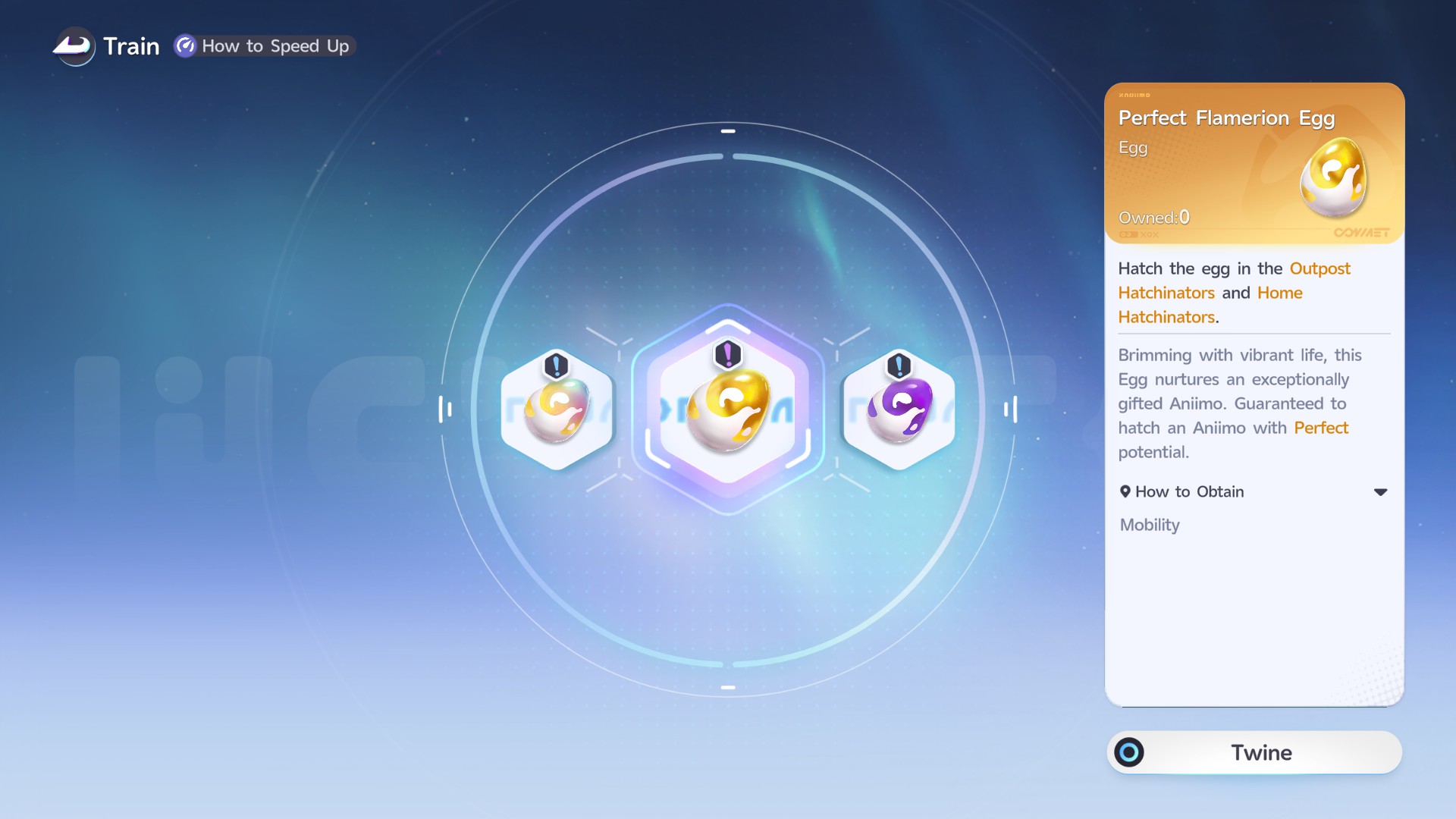
For this egg, the guarantee line reads: “Brimming with vibrant life, this Egg nurtures an exceptionally gifted Aniimo. Guaranteed to hatch an Aniimo with Perfect potential.” Two habits follow from it:
- Read the guarantee before you commit an item to the egg. This egg’s promise is about potential. It does not promise a species, an element, a stage or a form.
- Check the destination sentence for that specific egg. This one lists Outpost and Home Hatchinators; that is a fact about this egg, not a universal rule for every egg in the game.
This guide does not state hatch durations, incubation steps or a ready-to-claim flow, because the screenshots used here do not establish them.
The egg’s name also tells you which ANIIMO line it belongs to. ANIIMO Central’s Aniidex records every canonical ANIIMO, including Flamerion.
What Twine an Aniipod Does
Twine an Aniipod is the step where you attach an item to the egg before hatching. The Hatch screen lists the available items, shows the effect text of the one you select, and waits for you to confirm, so the screen itself tells you what the current selection changes.
| Twining item | Verified live-client effect | Practical effect |
|---|---|---|
| Aniipod Ultra | The hatched Aniimo's Potential rating will be at least Elite. | Raises the guaranteed minimum Potential tier. |
| Sparkling Cube | The hatched Aniimo is guaranteed to have Perfect Potential and be Sparkling. | Guarantees both Perfect Potential and Sparkling. |
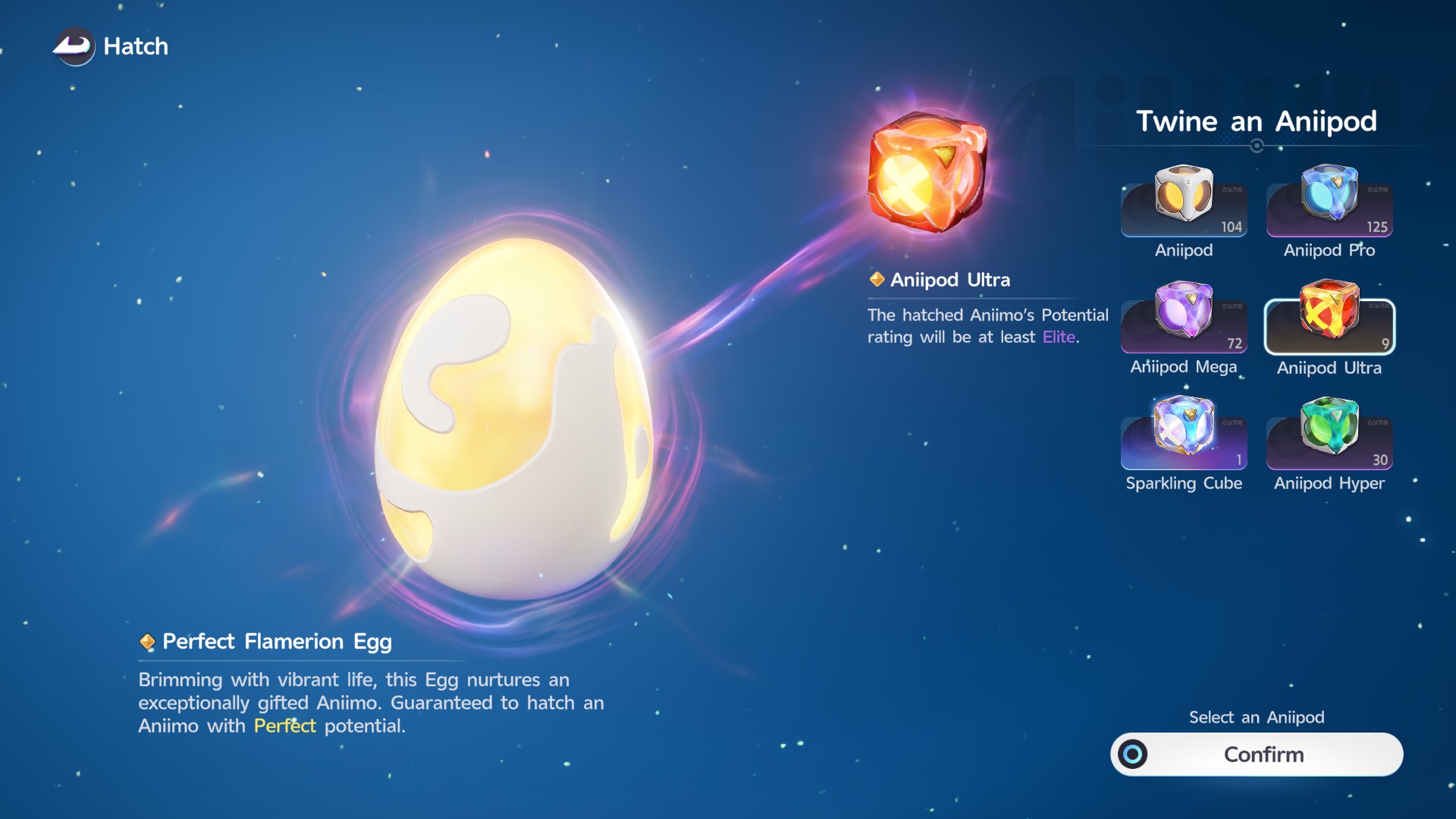
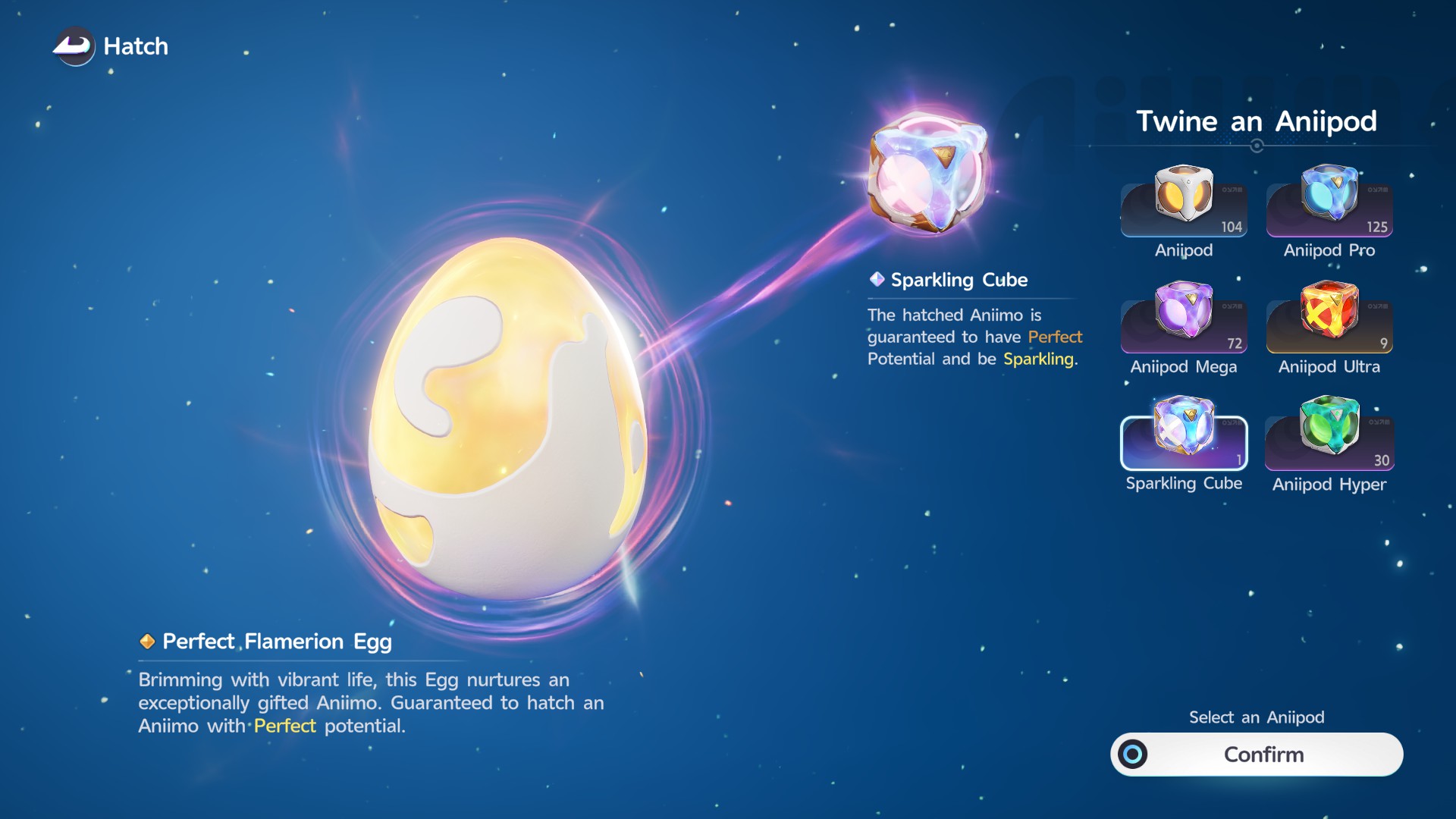
The contrast between those two screens is the whole point of the step: the egg stays the same, and the guarantee changes with the selected item. Read the effect text on the selection you are about to confirm.
Both texts sit on the same screen during this step: the egg’s own promise on the left, and the guarantee of the item you have selected on the right. Confirming accepts the combination the client is showing you, so the moment to compare the two is before you press it rather than after the hatch.
The same panel also lists Aniipod, Aniipod Pro, Aniipod Mega and Aniipod Hyper as options, but their effect text is not captured in this evidence set. This page therefore documents only the two effects above and does not describe the rest.
What Happens When an Egg Hatches
Hatching ends in a reveal: the client names the result, then presents the properties it has just confirmed around the egg.
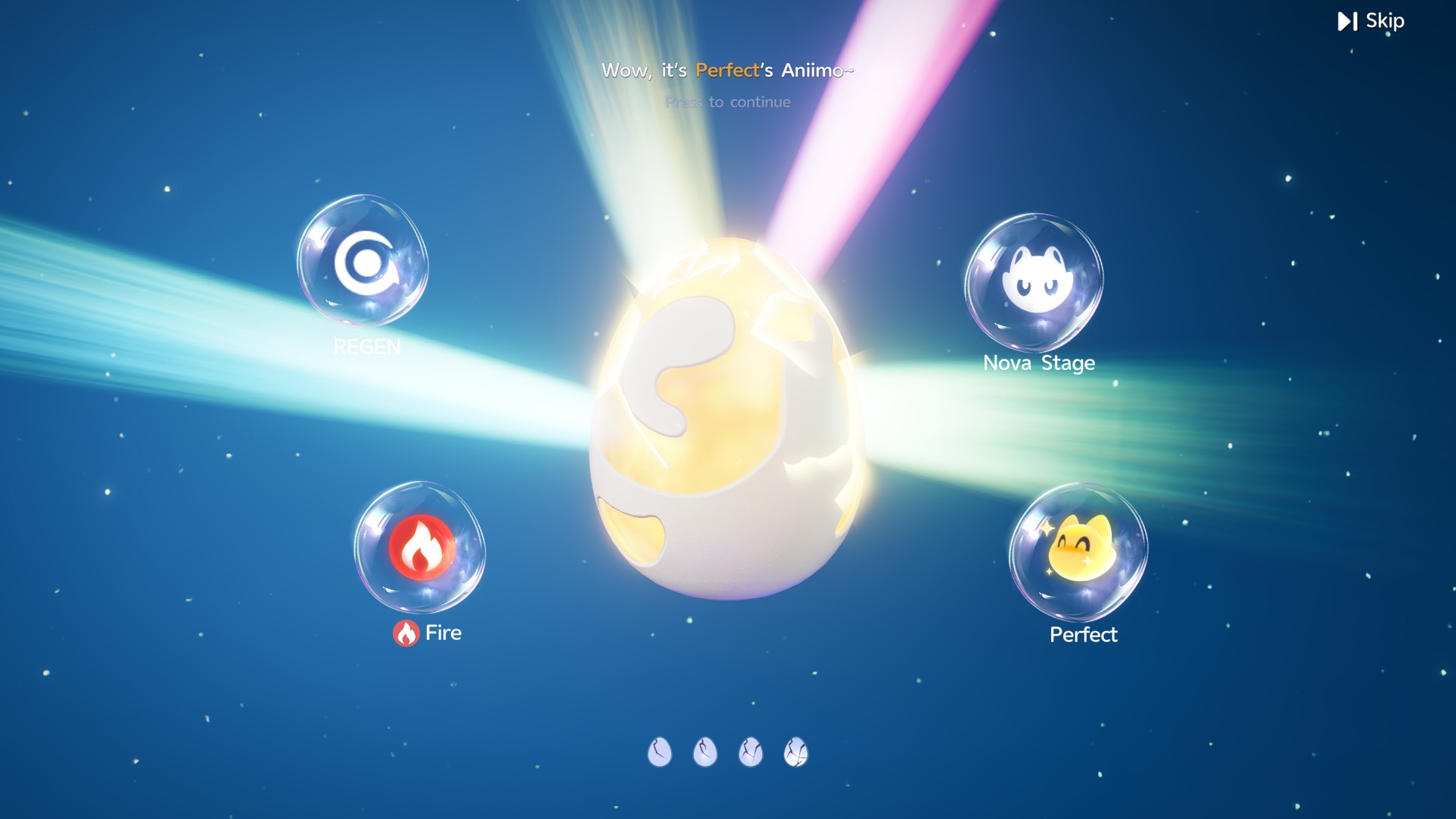
In this example the four revealed badges are Regen, Fire, Nova Stage and Perfect. Treat them as an example of what the result screen can surface rather than a fixed template every egg follows:
- The reveal can confirm several properties at once, covering categories the game tracks elsewhere, such as ability, element, evolution stage and potential.
- The badges are the quickest way to check that a guarantee actually landed — the Perfect badge on a Perfect-potential egg, for instance, or Sparkling when a Sparkling Cube was twined.
- The specific values here belong to this hatch. Another egg, or the same egg with a different twining item, can reveal a different set.
The reveal is also the point where the guarantees stop being text and become a result you can check. If you twined an item that promised a minimum Potential rating or a Sparkling outcome, the badges are where that promise is confirmed or shown alongside the rest of the hatch. After that, the ANIIMO’s own profile is the better place to read its full stat line and relationships, which ANIIMO Central keeps on the entity pages rather than duplicating inside this guide.
Can You Place a Hatchinator in Homeland?
Yes. The Hatchinator is a placeable Home facility, so hatching is not limited to travelling to an Outpost. In the Homeland build menu it appears under the Functional Facilities tab, in the Aniimo Facilities category, as Hatchinator Lv.1.
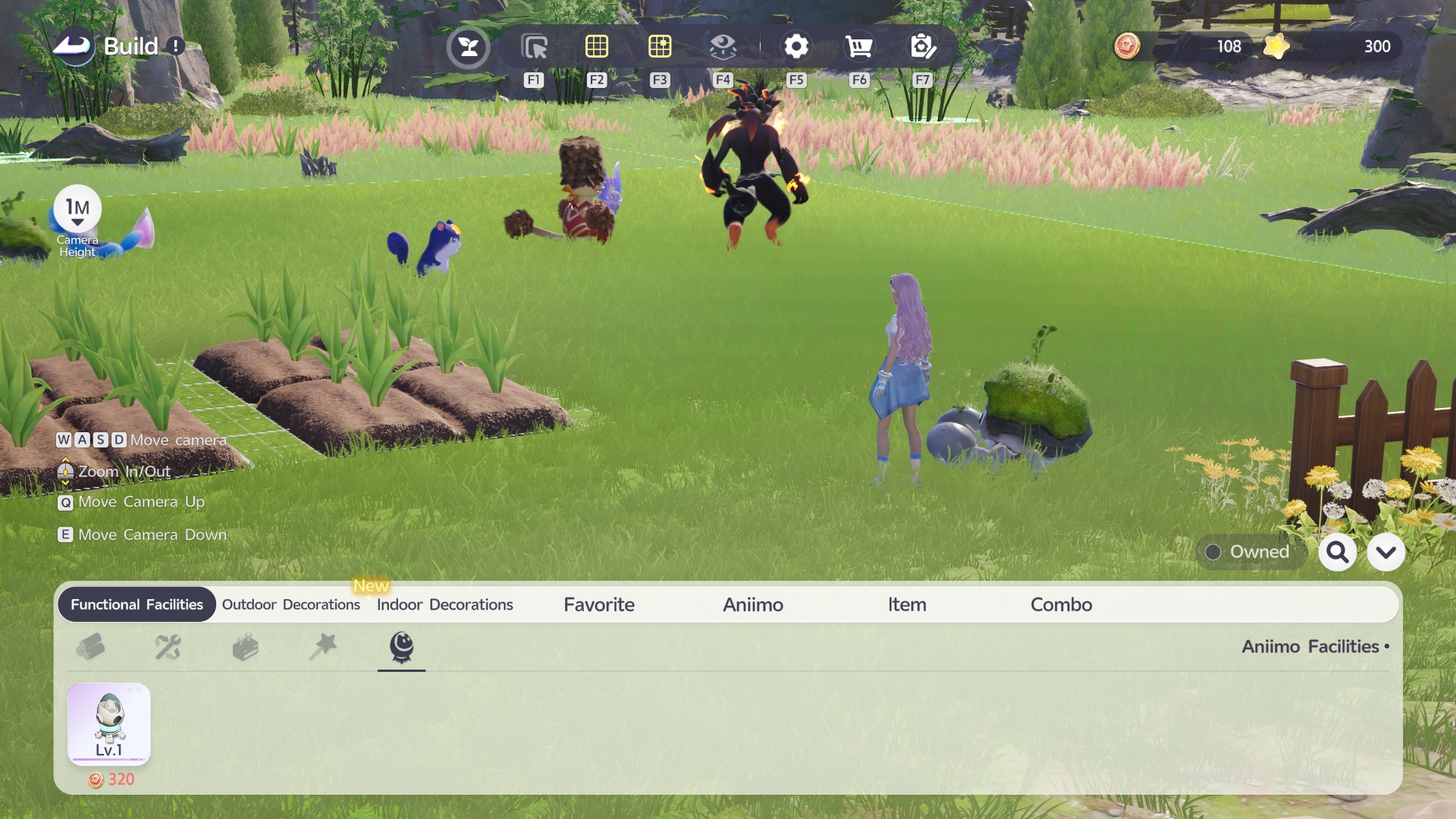
The current Home build screen shows a Lv.1 Hatchinator costing 320. That is the item, the category and the price as the client shows them; the screenshot does not establish any further building requirement, so none is claimed here.
As a practical note, the captured build menu shows the Hatchinator listed as a single Lv.1 entry rather than a level ladder, so no upgrade path beyond Lv.1 is claimed. Anyone who wants to hatch without travelling can start from that entry.
The practical difference between the two verified routes is travel versus ownership: an Outpost Hatchinator is a location you teleport to, while a Home Hatchinator is part of your own Homeland build. Home progression also carries its own separate egg rewards, which the Homeland guide documents.
Common Eggs & Hatching Mistakes
- Assuming every egg carries the same guarantee. Guarantee text is written per egg.
- Skipping the egg’s own item text. The detail screen states the hatch destinations and the promise.
- Twining an item without reading its effect. The selected item’s text is the only description of what it guarantees.
- Treating the visible item list as fully documented. Only the effects verified here are described.
- Forgetting the Home Hatchinator. Hatching is not Outpost-only.
- Reading result badges as a universal rule. A reveal shows what one hatch produced.
Eggs & Hatching FAQ
Where do you hatch eggs in ANIIMO?
At a Hatchinator. The verified egg detail text names Outpost Hatchinators and Home Hatchinators.
Can you hatch eggs at home?
Yes. The egg text lists Home Hatchinators, and the Homeland build menu offers a Hatchinator Lv.1 under Functional Facilities > Aniimo Facilities.
What does Aniipod Ultra do?
Live-client effect text: “The hatched Aniimo’s Potential rating will be at least Elite.”
What does Sparkling Cube do?
Live-client effect text: “The hatched Aniimo is guaranteed to have Perfect Potential and be Sparkling.”
Does every egg guarantee the same result?
No. Read the egg’s own guarantee — the example on this page promises Perfect potential only.
What does the hatch result screen show?
It reveals the hatched Aniimo’s properties. The verified example shows Regen, Fire, Nova Stage and Perfect.
What is Twine an Aniipod?
It is the step where you attach an item to the egg before hatching. The screen shows the selected item’s guarantee next to the egg’s own text and asks you to confirm.
Do you need to travel to an Outpost to hatch an egg?
No. The verified egg text lists Home Hatchinators as well as Outpost Hatchinators, and the Homeland build menu offers a Hatchinator Lv.1.
How much does a Home Hatchinator cost?
The current Home build screen shows a Lv.1 Hatchinator costing 320.
What about the other Aniipod variants?
Aniipod, Aniipod Pro, Aniipod Mega and Aniipod Hyper appear as options, but their effects are not verified in this evidence set, so this guide does not describe them.
Tips & warnings
- Guarantee text belongs to each individual egg; do not assume one egg's guarantee applies to another.
- This guide does not state hatch durations, a ready-to-claim flow, or the effects of Aniipod, Aniipod Pro, Aniipod Mega or Aniipod Hyper, because those are not established by the screenshots used here.
- Result badges shown in the hatch example belong to that hatch rather than to every egg.
What to do next
Sources & verification
- In-game verified: Perfect Flamerion Egg detail, Twine an Aniipod, hatch result, Aniimo Hatchinator, Outpost map and Homeland build screens, live game client Checked Oct 2, 2026.
Last updated: Oct 2, 2026